Key Takeaways
- Shared Logins Break Down: One login across a growing team means zero accountability. You can't trace actions, and you can't protect sensitive client data.
- The Solution: Role-based access gives each team member their own login and a clear scope.
- Built for Teams: An advanced mutual fund software in India like MutualFundSoftware adds branch-wise segregation and a full audit trail so every action across your firm stays traceable and secure.
- Real Outcome: A team that works within clear boundaries, clients whose data stays protected, and an admin who can trace any action back to the person who took it.
You started as a solo IFA doing everything yourself. Then came a telecaller, two RMs, and an operations person.
Now everyone needs platform access, but they definitely don't need to see the same things.
A telecaller doesn't need a client's full portfolio. One RM shouldn't see another RM's book.
The right mutual fund software for IFA handles this through role-based access, where each person sees exactly what their job needs and nothing more.
Why Does a Shared Login Cause Real Problems?
One login shared across your team sounds convenient until something actually goes wrong.
A client record gets changed, and nobody knows who did it. Someone exports a contact list, and you have no way to trace it.
An employee leaves, and disabling access means locking the whole team out.
Separate user accounts solve this cleanly. Each person gets their own login, their own activity log, and a defined scope.
The admin controls access, and that control holds as the team grows.
What Does Role-Based Access Look Like Day-to-Day?
A modern mutual fund software in India like MutualFundSoftware assigns permissions by job function. Not seniority. Not trust. Job function.
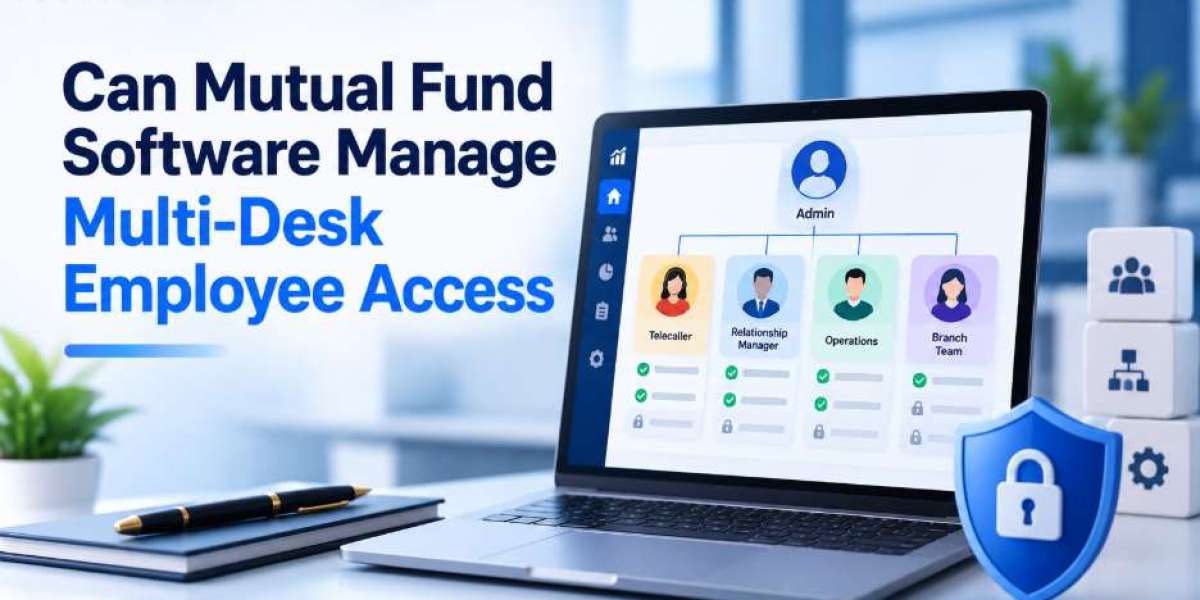
Here's what that looks like across a typical IFA team:
- Telecallers access leads, call logs, and follow-up tasks. Portfolio details and bank information stay hidden.
- Relationship managers see only their assigned clients. Another RM's book doesn't appear in their view at all.
- Operations staff handle KYC and transactions without seeing revenue dashboards or advisory notes.
- The admin sees everything and pulls consolidated reports across the whole firm.
Every action gets logged with a user ID and timestamp. If a record changes, you know who changed it.
Can You Control What Each Person Sees at Client Level?
Yes, and this matters more than most IFAs realise.
When a client is assigned to an RM, only that RM sees them in their dashboard.
Other RMs get no visibility into that relationship.
Folio numbers across key reports can be masked, so staff only see what their role requires.
That protection cuts internal data risk without slowing anyone down.
What Happens When the Team Grows Further?
New branches or desks slot in without redesigning the whole system:
- A Pune branch sees only Pune clients
- An HNI desk sees only HNI accounts
- The admin retains a full view across all of them
Adding a new RM means creating a user, assigning a role, and allocating clients. That's it.
The structure holds whether you have five people or fifty.
Conclusion
Multi-desk access isn't a bonus feature for large firms.
It's what keeps a growing IFA practice from turning into a data mess.
When each person works within a defined scope, accountability becomes clear, client data stays protected, and the business scales without confusion pulling it apart.
FAQs
Q1. Can I assign specific clients to individual RMs inside the platform?
Yes. Each client gets assigned to one RM, and only that RM sees them in their dashboard.
Q2. What if I want to give a new joiner limited access first?
You assign a restricted role on day one and expand permissions later as their responsibilities grow.
Q3. Can sensitive client information be hidden from specific team members?
Yes. Inside a mutual fund software for IFA like MutualFundSoftware, folio numbers across reports can be masked so each desk only sees what their role actually needs
Q4. Can branch heads see across multiple branches while keeping branch staff separate?
Yes. Each branch's users see only their own clients and records. A branch head or zonal manager gets a broader view covering multiple branches, while individual staff stay limited to their own desk.