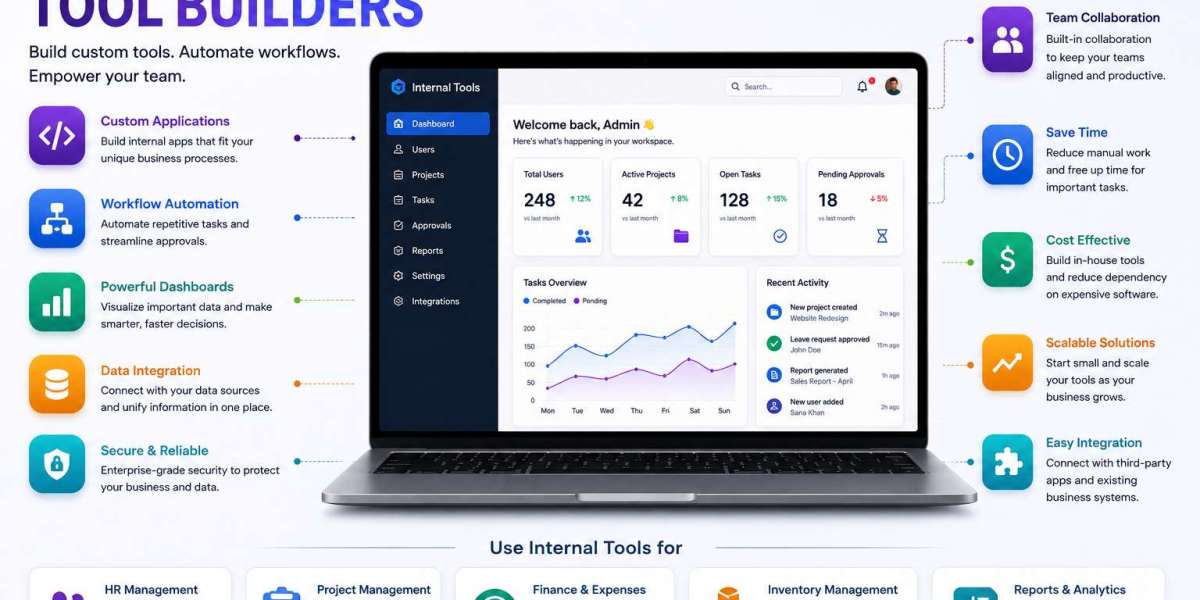
Businesses rely on numerous processes to manage their daily activities. From handling customer information and tracking projects to approving requests and generating reports, employees often use several tools to complete simple tasks. When these tools are not connected, work can become slower and less efficient.
Internal Tool Builders offer a practical way to solve this challenge. They allow organizations to create custom applications designed around their specific workflows, data, and team requirements.
What Are Internal Tool Builders?
Internal Tool Builders are software platforms that help businesses create applications for their internal teams. These applications are generally built to support employees rather than external customers.
Companies can use them to create dashboards, task management systems, approval workflows, inventory tools, reporting applications, and other custom solutions.
Many platforms include visual development features, database connections, integrations, automation tools, and user management capabilities. This allows teams to create useful applications without developing every component from scratch.
Why Are Internal Tools Important?
Every business has processes that are unique to its operations. Standard software may not always provide the exact features needed to manage these processes.
For example, a company may need a specific approval system that connects its finance, HR, and management teams. Instead of relying on emails and spreadsheets, the organization can create an internal application that manages the entire workflow.
This can make information easier to access and reduce unnecessary manual steps.
Benefits of Internal Tool Builders
Faster Tool Development
Internal Tool Builders provide ready-made components that can speed up application creation. Teams can build interfaces, connect data sources, and configure workflows without starting every project from zero.
Improved Productivity
Custom internal applications can be designed around how employees actually work. This can reduce repetitive tasks and make important information available in one place.
Workflow Automation
Businesses can automate repetitive activities such as notifications, approvals, data updates, task assignments, and reporting.
Automation can reduce manual effort and help employees focus on more important responsibilities.
Better Data Organization
Instead of maintaining information across multiple spreadsheets and applications, businesses can create centralized tools that bring relevant data together.
This can improve visibility and make it easier for teams to find the information they need.
Easy Customization
Business requirements can change over time. Internal Tool Builders allow organizations to modify applications, add new fields, update workflows, and introduce new functionality as their needs evolve.
Common Internal Tools Businesses Can Build
There are many ways organizations can use Internal Tool Builders.
Employee Management Tools
HR teams can create applications for employee records, onboarding processes, leave requests, performance tracking, and internal documentation.
Sales Management Systems
Sales teams can use custom tools to track leads, manage customer information, monitor opportunities, and organize follow-up activities.
Inventory Applications
Businesses can build inventory systems that track products, stock levels, suppliers, orders, and warehouse activities.
Project Management Tools
Custom project applications can help teams manage tasks, deadlines, responsibilities, progress, and project-related information.
Approval Workflows
Organizations can create digital approval systems for expenses, purchases, leave requests, documents, and other business activities.
Reporting Dashboards
Internal dashboards can combine information from different sources and display important business metrics in an easy-to-understand format.
Key Features to Look For
Choosing the right Internal Tool Builder requires an understanding of the features a business needs.
Visual Application Builder
A visual interface can make it easier for teams to create applications and arrange different components without extensive coding.
Database Connectivity
The ability to connect with databases is essential for many internal applications. It allows teams to access and manage business information from a centralized interface.
API Integrations
API support allows internal tools to communicate with other software platforms. This can help businesses create connected workflows across their technology stack.
Automation
Automation features can trigger actions when specific events occur. For example, submitting a request could automatically notify a manager and create an approval task.
User Access Controls
Different employees may require different permissions. Role-based access can help organizations control who can view, edit, or manage specific information.
Reporting and Analytics
Built-in reporting features can help managers monitor business performance and make decisions based on current information.
Internal Tool Builders and Low-Code Development
Many Internal Tool Builders use low-code or no-code development approaches. These approaches allow users to create applications with visual components and configuration instead of writing large amounts of code.
Low-code development can be especially useful for business teams that understand their workflows but do not have advanced programming skills.
However, technical teams can also benefit because they can use these platforms to create applications faster while focusing their coding efforts on more complex requirements.
How Internal Tools Improve Workflows
Consider a business where employees submit requests through email. A manager reviews the request, another employee updates a spreadsheet, and the finance team later processes the information.
This process can involve several manual steps.
With a custom internal application, employees could submit the request through a centralized form. The system could automatically notify the appropriate manager, update the database, and create a task for the finance team.
This type of automation can make the workflow more organized and easier to track.
Security Considerations
Internal applications can contain important business information. Customer records, employee details, financial data, and operational information may all require protection.
Businesses should therefore evaluate security features when selecting an Internal Tool Builder.
Important areas include authentication, user permissions, data protection, access management, activity tracking, and secure integrations.
A well-designed internal tool should make information accessible to authorized employees while preventing unnecessary access.
Choosing the Right Internal Tool Builder
The best platform depends on the organization's goals and technical requirements.
Before selecting a solution, businesses should consider:
- Type of applications they need to build
- Ease of use
- Database support
- Integration capabilities
- Automation features
- Security and permissions
- Scalability
- Customization options
- Collaboration features
- Pricing
- Technical support
It can also be helpful to start with a small internal project. This allows a team to evaluate the platform before using it for more important business processes.
Internal Tool Builders for Growing Companies
As organizations grow, their internal processes often become more complex. What works for a small team may not be suitable when the company has multiple departments and larger amounts of data.
Internal Tool Builders can help growing businesses create applications that evolve with their operations.
Teams can begin with a simple tool and gradually add integrations, automation, dashboards, and additional functionality as requirements increase.
The Future of Internal Tool Development
The development of low-code platforms, automation, cloud technologies, and artificial intelligence is changing the way businesses create internal applications.
Modern platforms can increasingly connect different data sources, automate complex workflows, and introduce AI-powered functionality.
For example, businesses may use AI to summarize internal reports, categorize requests, analyze operational data, or assist employees with routine tasks.
This means internal tools are becoming more than simple dashboards. They are evolving into intelligent systems that can actively support business operations.
Conclusion
Internal Tool Builders provide businesses with an efficient way to create custom applications for their employees and internal processes. They can help organizations automate workflows, organize data, improve productivity, and reduce dependence on disconnected tools.
From HR systems and sales dashboards to inventory applications and approval workflows, internal tools can be adapted to many different business requirements.
As companies continue to adopt automation and AI, Internal Tool Builders can provide a flexible foundation for creating smarter and more efficient business operations.