Industry 4.0 is changing how machines are designed, operated, monitored, and maintained. Modern manufacturing equipment is no longer expected to simply perform a predefined task. OEMs and machine builders are increasingly expected to deliver equipment that can visualize real-time data, connect with automation systems, support intelligent diagnostics, and provide operators with faster and clearer information.
At the center of this interaction is the Human-Machine Interface (HMI). And while the HMI is becoming more software-driven and connected, the physical industrial panel monitor remains a critical part of the machine.
Recent 2026 industry discussions show that HMIs are evolving from simple machine-status displays into connected edge devices capable of supporting data logging, analytics, cloud integration, and industrial communication.
For OEMs, this creates an important opportunity: selecting the right OEM industrial panel monitor can help build machines that are easier to operate, more connected, and ready for future Industry 4.0 requirements.
What Is an OEM Industrial Panel Monitor?
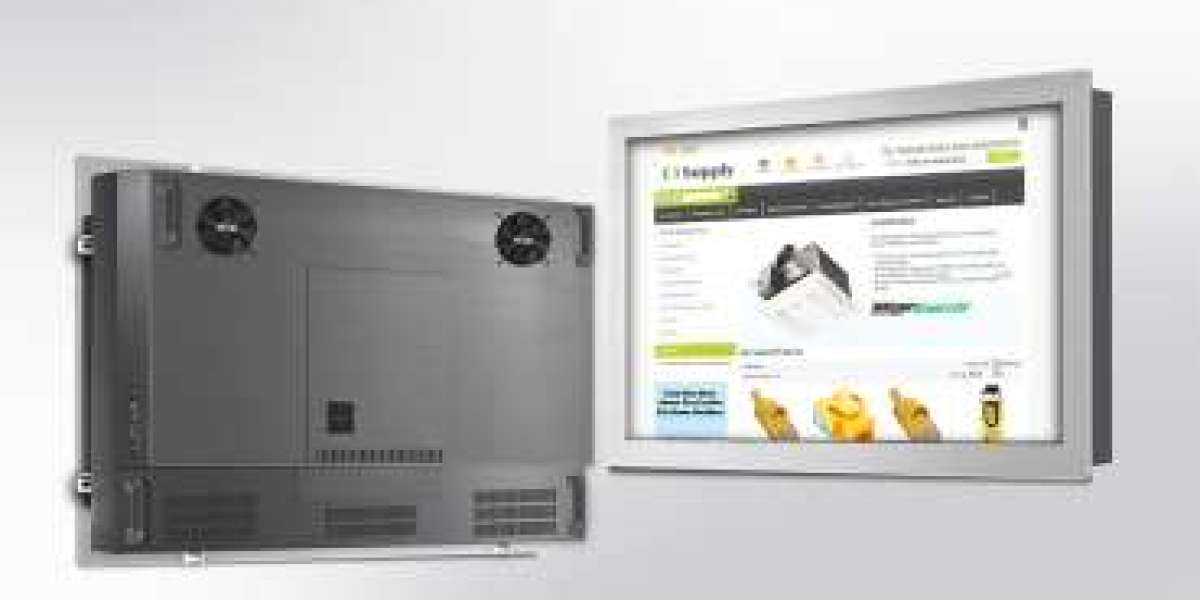
An OEM industrial panel monitor is a display designed to be integrated directly into industrial machinery, control panels, automation equipment, or operator stations.
Unlike a conventional office monitor, an industrial panel monitor is selected around the requirements of the machine and its operating environment.
Depending on the configuration, OEMs may need to consider:
- Display size
- Resolution
- Brightness
- Touchscreen technology
- Panel-mount dimensions
- Industrial interfaces
- Operating temperature
- Environmental protection
- Mechanical construction
- Long-term availability
- Customization requirements
Panel-mount monitors are particularly relevant to industrial automation because they can be integrated directly into machines and control panels. The panel-mount segment represented the largest type share in a recent 2026 industrial-display market analysis, while HMI was the leading application segment.
Why Industrial Panel Monitors Matter for Industry 4.0
Industry 4.0 is fundamentally about connecting machines, people, processes, and data.
An operator should not have to interpret dozens of disconnected indicators to understand what is happening on a production machine.
A modern HMI can bring information together in a single interface:
Machine → Sensors → PLC/IPC → HMI → Operator
The industrial panel monitor provides the visual layer through which the operator interacts with this information.
Modern HMIs are increasingly expected to provide real-time information, centralized monitoring, analytics, and connectivity with wider factory systems.
- Give Operators Real-Time Machine Information
One of the simplest ways OEMs can improve a machine is by providing operators with useful information at the right time.
Instead of displaying only:
Machine Running
a modern HMI can show:
- Production speed
- Machine temperature
- Cycle time
- Production count
- Energy consumption
- System status
- Alarm conditions
- Maintenance information
- Quality indicators
This allows operators to understand the machine's condition without accessing multiple systems.
The goal isn't simply more information.
The goal is better information.
Modern HMI design increasingly emphasizes clear, contextual information and operator workflow rather than overwhelming users with unnecessary data.
- Support Smarter Machine Control
An OEM industrial panel monitor can become the primary control interface for the machine.
Depending on the application, operators can use the HMI to:
- Start and stop processes
- Adjust machine parameters
- Select operating modes
- Monitor production
- Manage alarms
- View diagnostics
- Access maintenance functions
- Change recipes
- Review production data
For OEMs, this means the monitor is no longer simply a display component.
It becomes part of the machine's overall control experience.
- Connect the HMI to Industry 4.0 Systems
A major Industry 4.0 requirement is connecting machine-level information with higher-level systems.
A modern HMI architecture may communicate with:
PLC → HMI → SCADA → MES → ERP / Analytics
Modern industrial HMI architectures increasingly use open communication standards such as OPC UA and MQTT, helping connect machine data with broader industrial systems.
For OEMs, supporting this connectivity can make machines easier for customers to integrate into existing smart-factory infrastructures.
- Make Machine Data More Actionable
Collecting data is not enough.
The operator needs to understand what the data means.
For example, instead of simply displaying:
Motor Temperature: 82°C
the HMI could provide contextual information such as:
Motor Temperature: 82°C
Status: Warning
Recommended Action: Inspect cooling system
This approach can turn machine data into actionable information.
For OEMs, better visualization can improve:
- Operator awareness
- Troubleshooting
- Maintenance
- Production efficiency
- Response time
- Enable Predictive Maintenance Strategies
Industry 4.0 machines increasingly collect operational information that can be used for maintenance.
An industrial HMI can visualize parameters such as:
- Motor temperature
- Vibration
- Operating hours
- Cycle count
- Error frequency
- Energy consumption
- Component status
When combined with appropriate software and sensors, this information can help identify unusual trends.
For example:
Motor temperature increasing → abnormal trend detected → maintenance inspection recommended
The industrial panel monitor becomes the point where the maintenance team can see the condition of the machine.
- Choose the Right Display for the Industrial Environment
Industry 4.0 does not eliminate traditional industrial requirements.
A smart HMI still needs to survive the environment where the machine operates.
OEMs should evaluate:
Brightness
Machines installed in brightly illuminated production areas may require higher brightness for clear visibility.
Operating Temperature
The monitor should match the temperature conditions around the machine.
Touch Technology
Depending on the application, OEMs may choose between capacitive and resistive touch technologies.
Mechanical Construction
The monitor should be compatible with the machine's mounting structure.
Environmental Protection
Dust, moisture, vibration, chemicals, and cleaning procedures should all be considered where applicable.
Connectivity
The display must support the interfaces required by the industrial computer or control architecture.
- Stainless Steel Panel Monitors for Demanding Applications
Some Industry 4.0 applications operate in environments where equipment needs additional mechanical and hygienic considerations.
This includes:
- Food processing
- Beverage production
- Pharmaceutical manufacturing
- Packaging
- Hygienic production
- Specialized machinery
For these applications, stainless steel industrial panel monitors can be an attractive option because the stainless construction can provide a robust and cleanable external surface.
However, OEMs should not assume that stainless steel automatically means food-grade or washdown-rated.
The complete specification—including sealing, IP rating, materials, mounting, and certifications—should be checked for the intended application.
- Compact Displays Can Support Space-Constrained Machines
Machine builders often have limited space inside equipment.
A large control panel isn't always practical.
This makes compact industrial displays particularly useful for:
- Packaging machines
- CNC equipment
- Robotics
- Automated assembly
- Inspection machines
- Material-handling equipment
- Compact production systems
A 10.1-inch or 12-inch panel monitor, for example, can provide substantial HMI workspace while maintaining a relatively compact machine footprint.
The broader industrial-display market is also seeing continued demand for small and medium-sized displays combined with greater customization for industrial applications.
- Design the HMI Around the Machine—not the Other Way Around
One of the biggest mistakes OEMs can make is selecting a monitor first and trying to adapt the machine around it.
A better approach is:
Machine requirements → HMI requirements → Monitor specification
Start by identifying:
- Operator viewing distance
- Available panel space
- Required information
- Touch requirements
- Environmental conditions
- Required interfaces
- Mounting requirements
- Brightness requirements
- Operating temperature
- Future software requirements
Then select the monitor configuration.
This approach is particularly important for OEMs producing machines in volume.
- Customization Can Give OEMs More Design Freedom
Every machine is different.
One OEM may require a standard industrial monitor.
Another may need:
- A specific screen size
- Custom mounting
- Different connectors
- Higher brightness
- Touch integration
- Special mechanical construction
- Specific temperature range
- Customized housing
- OEM branding
Current industrial-display trends show a movement toward application-specific engineering and deeper customization, rather than relying exclusively on standardized displays.
For OEMs, customization can help avoid unnecessary compromises in the machine design.
- Long-Term Availability Matters to OEMs
A machine may be sold and supported for many years.
Therefore, the display supplier should be evaluated not only on today's price but also on long-term support.
Before selecting an OEM industrial panel monitor, ask:
- How long will the model remain available?
- Are replacement models planned?
- Can specifications change without notice?
- Is technical support available?
- Can the supplier provide customized configurations?
- Are spare units available?
- Can the display be standardized across multiple machine models?
For OEMs, product lifecycle management can be just as important as display performance.
- Build a Consistent HMI Across Multiple Machines
OEMs producing several machines can benefit from standardizing their HMI platform.
For example, the same interface philosophy can be used across:
Machine A → Machine B → Machine C → Production Line
This gives operators a familiar experience.
It can also simplify:
- Training
- Service
- Documentation
- Software development
- Spare-parts management
- Machine upgrades
Modern HMI strategies increasingly focus on consistent interfaces and centralized information across multiple production assets.
What Should OEMs Look for When Buying an Industrial Panel Monitor?
Before selecting an OEM industrial panel monitor, use this checklist:
Requirement | What OEMs Should Check |
Screen Size | 7", 10.1", 12", 15" or application-specific |
Resolution | Match to HMI software and viewing requirements |
Brightness | Suitable for actual ambient lighting |
Touch | Capacitive or resistive based on operator needs |
Mounting | Panel cutout and installation depth |
Interfaces | VGA, HDMI, DisplayPort, USB, etc. |
Temperature | Suitable operating temperature |
Protection | Required IP/environmental rating |
Construction | Standard, rugged or stainless steel |
Lifecycle | Long-term product availability |
Customization | Mechanical, electrical and touch options |
Support | Engineering and technical assistance |
Why TecSys Industrial Panel Monitors Can Be Considered for OEM Projects
TecSys offers a broad range of industrial display solutions, including panel-mount monitors, stainless-bezel monitors, touchscreen displays, chassis monitors, medical monitors, and other industrial display configurations.
For OEMs, the important consideration is not simply the monitor itself but how effectively it can be integrated into the complete machine.
TecSys' range includes different panel-mount configurations, including Stainless Bezel PM 5 Series monitors, providing options for OEMs that need industrial displays with specific mechanical and application requirements.
For a new Industry 4.0 machine, OEMs should evaluate the exact configuration based on the machine's display, touch, mounting, environmental, connectivity, and lifecycle requirements.
The Future of OEM Machine Interfaces
The role of the industrial monitor is changing.
The HMI is moving from:
“Show machine status.”
to:
“Help the operator understand, control, and optimize the machine.”
That evolution is already visible in 2026, with industrial HMI systems increasingly incorporating edge computing, connectivity, data integration, analytics, and more advanced operator workflows.
For OEMs, this means the industrial panel monitor should be considered as part of the machine's digital architecture, not as an isolated hardware component.
Final Takeaway
OEM industrial panel monitors are becoming an important building block for Industry 4.0 machine design.
The right display can provide operators with real-time information, simplify machine control, support diagnostics, visualize production data, and act as an interface between the machine and broader digital manufacturing systems.
But choosing the right monitor requires more than looking at screen size or resolution.
OEMs should evaluate touch technology, brightness, mounting, connectivity, environmental conditions, mechanical construction, customization, and long-term availability.
For machine builders looking to develop smarter equipment in 2026, the goal should be to select an industrial panel monitor that can grow with the machine—not simply meet today's display requirements.
Read More: https://tecsysproductguides.blogspot.com/2026/08/oem-industrial-panel-monitors-for.html