
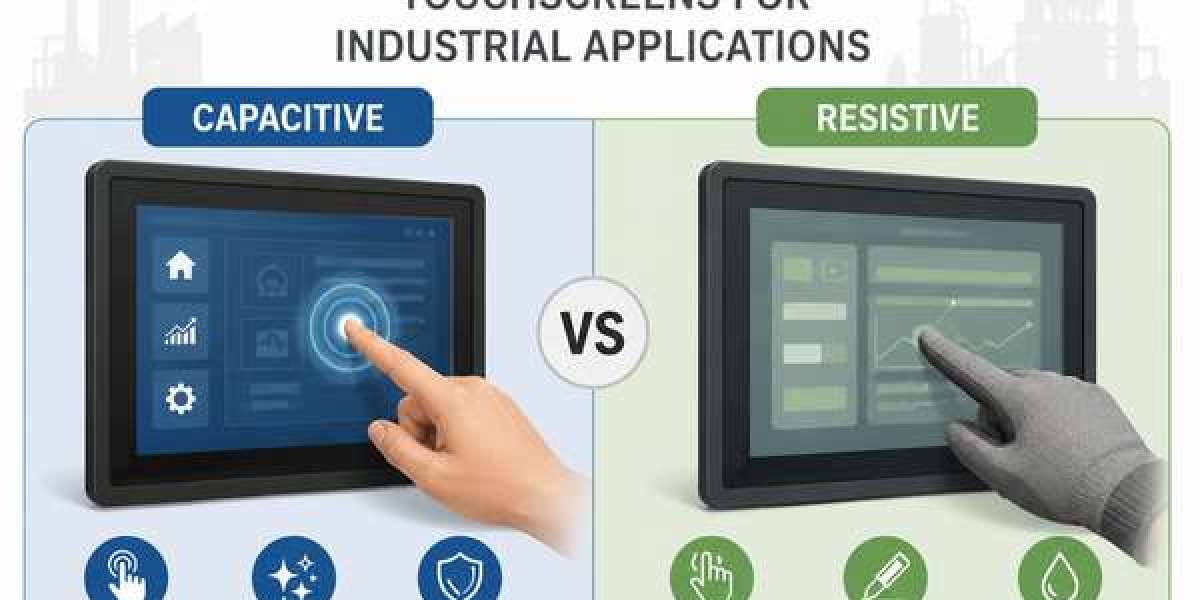
As industrial automation continues to evolve, touchscreen technology has become a critical component of Human-Machine Interface (HMI) systems, industrial monitors, panel PCs, kiosks, and machine control applications. Whether in manufacturing plants, logistics centers, healthcare facilities, or transportation systems, selecting the right touchscreen technology directly impacts usability, productivity, and operational efficiency.
Two of the most widely used touchscreen technologies in industrial environments are Capacitive Touchscreens Vs Resistive Touchscreens. While both technologies enable touch-based interaction, they differ significantly in performance, durability, responsiveness, and application suitability.
This guide compares capacitive and resistive displays to help industrial buyers, OEMs, and system integrators make informed purchasing decisions.
Understanding Industrial Touchscreen Technologies
Before comparing the two technologies, it is important to understand how they work.
What Is a Capacitive Touchscreen?
A capacitive touchscreen uses the electrical properties of the human body to detect touch input. When a finger touches the screen, it changes the electrical field, allowing the controller to determine the exact touch location.
Modern industrial capacitive displays typically use Projected Capacitive (PCAP) technology, which supports multi-touch functionality and offers a smooth user experience similar to smartphones and tablets.
What Is a Resistive Touchscreen?
A resistive touchscreen consists of multiple conductive layers separated by a small gap. When pressure is applied to the screen, the layers make contact and register the touch location.
Unlike capacitive technology, resistive touchscreens respond to pressure rather than electrical conductivity, allowing operation with fingers, gloves, styluses, or other objects.
Capacitive vs Resistive Touchscreens: Key Comparison
- Touch Accuracy and Responsiveness
Capacitive Touchscreens
Capacitive displays provide:
- Fast response times
- Smooth touch interaction
- High precision
- Multi-touch functionality
- Gesture support
Users can zoom, swipe, and interact with interfaces naturally.
Resistive Touchscreens
Resistive displays offer:
- Reliable single-touch operation
- Pressure-based input
- Accurate touch detection
However, they generally provide slower response times compared to capacitive displays.
Winner: Capacitive Touchscreens
For applications requiring fast and intuitive interaction, capacitive technology offers superior performance.
- Multi-Touch Capability
Modern industrial software increasingly relies on gesture-based controls and advanced user interfaces.
Capacitive Displays
Support:
- Multi-touch gestures
- Pinch-to-zoom
- Swipe navigation
- Simultaneous touch points
Resistive Displays
Typically support:
- Single-touch input
- Limited gesture functionality
Winner: Capacitive Touchscreens
Capacitive displays are ideal for advanced HMI systems and modern industrial applications.
- Image Quality and Visibility
Screen clarity is essential for operators working with complex industrial systems.
Capacitive Displays
Benefits include:
- Excellent light transmission
- Sharp image quality
- Higher brightness levels
- Better color reproduction
Resistive Displays
The additional touchscreen layers can reduce:
- Brightness
- Contrast
- Optical clarity
Winner: Capacitive Touchscreens
Industries requiring detailed visual information often prefer capacitive technology.
- Glove Compatibility
Many industrial workers operate equipment while wearing gloves.
Capacitive Displays
Traditional capacitive screens require direct skin contact. However, modern industrial PCAP displays can support:
- Industrial gloves
- Specialized conductive gloves
- High-sensitivity touch modes
Resistive Displays
Because they rely on pressure, resistive touchscreens work with:
- Standard work gloves
- Thick protective gloves
- Styluses
- Any pressure-based object
Winner: Resistive Touchscreens
For environments requiring heavy glove usage, resistive technology remains highly effective.
- Durability in Industrial Environments
Industrial environments expose equipment to:
- Dust
- Moisture
- Chemicals
- Vibrations
- Extreme temperatures
Capacitive Displays
Industrial-grade capacitive screens offer:
- Strong glass surfaces
- Scratch resistance
- Long operational life
- Excellent durability
Resistive Displays
Resistive screens are durable but can be more susceptible to:
- Surface wear
- Scratches
- Repeated pressure damage
Winner: Capacitive Touchscreens
For long-term durability and lower maintenance requirements, capacitive technology often performs better.
- Cost Considerations
Budget remains an important factor when selecting industrial touchscreen solutions.
Capacitive Displays
Generally feature:
- Higher initial investment
- Advanced functionality
- Better user experience
Resistive Displays
Typically offer:
- Lower upfront costs
- Simple operation
- Cost-effective deployment
Winner: Resistive Touchscreens
Organizations with limited budgets may find resistive displays more economical.
Feature Comparison Table
Feature | Capacitive Touchscreen | Resistive Touchscreen |
Touch Response | Excellent | Good |
Multi-Touch Support | Yes | Limited |
Gesture Control | Yes | No |
Image Clarity | Excellent | Good |
Glove Operation | Limited to supported gloves | Excellent |
Stylus Compatibility | Special stylus required | Works with standard stylus |
Durability | High | Moderate |
Scratch Resistance | Excellent | Moderate |
Cost | Higher | Lower |
User Experience | Superior | Basic |
Best Applications for Capacitive Touchscreens
Capacitive touchscreen technology is ideal for:
Manufacturing Automation
Advanced machine interfaces requiring intuitive control.
Industrial Panel PCs
Modern operator workstations and smart factory environments.
Healthcare Equipment
Medical devices requiring precision and high display clarity.
Logistics and Warehousing
Interactive inventory management systems and monitoring stations.
Transportation Systems
Vehicle terminals and fleet management displays.
Best Applications for Resistive Touchscreens
Resistive touchscreen technology remains valuable for:
Harsh Industrial Environments
Facilities where operators wear heavy protective gloves.
Factory Floor Equipment
Applications requiring simple and reliable touch interaction.
Outdoor Industrial Systems
Locations exposed to varying environmental conditions.
Legacy Industrial Machinery
Equipment designed around single-touch interfaces.
Cost-Sensitive Deployments
Projects where affordability is a primary consideration.
Which Touchscreen Technology Should You Choose?
Choose a Capacitive Touchscreen if your application requires:
- Multi-touch functionality
- Modern user interfaces
- Superior image quality
- High durability
- Enhanced user experience
Choose a Resistive Touchscreen if your application requires:
- Reliable glove operation
- Stylus input
- Lower acquisition costs
- Simple single-touch interaction
- Compatibility with older industrial systems
Future Trends in Industrial Touchscreen Technology
As Industry 4.0 adoption accelerates, capacitive touchscreen technology continues to gain popularity due to its ability to support advanced HMIs, digital workflows, and intelligent automation systems.
However, resistive touchscreens continue to serve critical roles in demanding industrial environments where glove operation and cost efficiency remain priorities.
Manufacturers are also developing hybrid solutions that combine rugged construction, glove compatibility, and enhanced touch sensitivity to meet evolving industrial requirements.
Conclusion
The choice between capacitive and resistive displays depends largely on your operational requirements, user environment, and budget. Capacitive touchscreens offer superior responsiveness, multi-touch capabilities, durability, and visual clarity, making them the preferred choice for modern industrial automation systems.
Resistive touchscreens remain an excellent solution for glove-intensive applications, harsh environments, and cost-conscious projects.
By carefully evaluating your application needs, working conditions, and long-term operational goals, you can select the touchscreen technology that delivers the best performance, reliability, and return on investment for your industrial operations.
Read More: https://tecsysproductguides.blogspot.com/2026/06/industrial-touchscreen-technology.html