
How to Choose a 17-Inch Flush Mount Industrial Monitor for Your Application

Choosing the right 17-inch flush mount industrial monitor is important for machine builders, industrial automation companies and OEMs. The monitor must fit the equipment, display information clearly and support the requirements of the working environment. Selecting the wrong display can lead to installation difficulties, compatibility issues and additional costs.
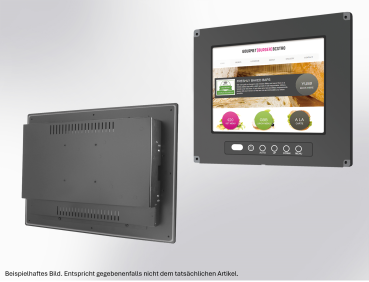
A 17-inch flush mount industrial monitor is designed to be integrated into a machine panel, control cabinet or industrial workstation. Its flush-mounted design creates a neat installation while providing screen space for machine data, process visualisation and operator interfaces.
However, screen size alone is not enough to determine whether a monitor is suitable. Before purchasing, businesses should consider mounting dimensions, resolution, brightness, connectivity, touchscreen requirements and long-term product availability.
This guide explains how to select a suitable 17-inch flush mount industrial monitor for your application.
1. Understand Your Application Requirements
Start by identifying how the monitor will be used. Different industrial applications have different display requirements.
For example, a monitor used in a factory control panel may display production information, machine status and operating parameters. A display used in a testing system may need to show measurement results, technical diagrams and detailed data. In an industrial HMI application, operators may need to interact directly with software running on a connected computer or controller.
Before choosing a monitor, consider:
- What information will appear on the screen?
- Will operators interact with the display using touch?
- How far away will users typically view the screen?
- Will the monitor operate continuously?
- Will it be installed in a protected enclosure or an exposed industrial area?
- Does the project require a standard product or a specific configuration?
Answering these questions helps narrow down the available options and makes it easier to compare suitable models.
2. Check the Display Size and Resolution
A 17-inch monitor can be suitable when operators need more screen space than a smaller display provides. It can accommodate multiple interface elements, process diagrams, monitoring dashboards and technical information.
However, the required resolution is equally important. Resolution determines the amount of detail a display can show and affects how clearly text, graphics and data appear.
For applications that display detailed information, check whether the monitor's resolution matches the software and computer system being used. You should also confirm that the operating system and graphics hardware support the selected display resolution.
Consider the viewing distance and interface design as well. Small text may be difficult to read if the screen layout has not been designed for the selected resolution and typical operator position.
When comparing industrial monitors, review the manufacturer's datasheet rather than assuming all 17-inch displays have identical resolution or visual performance.
3. Confirm Flush Mounting Compatibility
Mounting compatibility is one of the most important factors when selecting a flush mount industrial monitor.
Although two monitors may have the same screen size, their overall dimensions, panel cutouts, mounting depth and fixing arrangements may differ. A display that does not fit the available space can require changes to the machine enclosure or control panel.
Before ordering, check:
- Overall monitor dimensions
- Required panel cutout dimensions
- Mounting depth behind the panel
- Fixing and mounting arrangements
- Connector positions and cable clearance
- Space available for ventilation and servicing
If you are replacing an existing monitor, compare the mechanical drawings of both products. Do not rely on screen size alone to determine compatibility.
For new machine designs, involving the display supplier early can help engineers plan the panel layout and avoid unnecessary modifications during assembly.
4. Select the Right Brightness and Viewing Performance
The installation environment determines how much brightness and viewing performance you need.
A monitor installed inside a controlled industrial environment may have different requirements from one positioned near large windows or under strong factory lighting. If the screen is difficult to read, operators may struggle to interpret machine information accurately.
Check the specified brightness, viewing angles and display characteristics for the exact model. Consider whether the screen will be viewed from the front only or from different positions around the machine.
You should also assess whether the display surface and mounting position are likely to create reflections under the site's lighting conditions.
For applications where operators rely on detailed information, evaluate the display under representative working conditions whenever possible. A datasheet comparison is useful, but the actual installation environment should guide the final decision.
5. Decide Whether You Need a Touchscreen
Not every industrial application requires a touchscreen. The right choice depends on how operators use the equipment.
A standard monitor may be sufficient when the screen primarily displays information and users provide commands through separate controls, buttons or a keyboard.
A touchscreen can be useful when operators need to select menus, enter values, acknowledge alarms or interact directly with an HMI interface.
Industrial monitors may offer different touchscreen technologies, including resistive and projected capacitive options. Their suitability depends on the application, operating conditions and intended interaction method.
Before purchasing a touchscreen model, confirm its touch interface, compatibility with the host system and any relevant operating requirements. Also consider whether operators will use gloves and whether the screen may be exposed to moisture or contaminants.
The supplier should confirm which touchscreen options are available for the exact 17-inch monitor configuration.
6. Verify Connectivity and Power Requirements
An industrial monitor must connect correctly to the computer, controller or embedded system that supplies its video signal.
Depending on the equipment, you may require HDMI, DisplayPort, VGA, DVI or another interface. Touchscreen models may also need a separate connection for touch input.
Check the available output ports on the host system and compare them with the monitor's supported inputs. Confirm any requirements relating to power supply, cable length, connector access and installation space.
If the monitor is being integrated into existing machinery, document the current system's connections before selecting a replacement. For new equipment, confirm the interface requirements during the design stage.
These checks help reduce the risk of ordering a display that is mechanically suitable but cannot connect directly to the intended system.
7. Evaluate the Industrial Operating Environment
Industrial equipment can operate in environments involving dust, vibration, temperature changes and continuous use. The monitor's specifications must match the conditions in which it will be installed.
Review the operating temperature range, front-panel protection rating and any documented vibration or environmental resistance relevant to your application.
If the monitor will be exposed to dust or moisture, check the exact protection rating and the conditions under which it applies. Do not assume that every industrial monitor is suitable for washdown areas or outdoor installation.
For equipment that operates for long periods, ask about the manufacturer's intended operating conditions and maintenance recommendations.
Selecting a display based on documented requirements is more reliable than choosing a product simply because it is marketed as an industrial monitor.
8. Compare Suppliers, Availability and Long-Term Support
Price matters, but the lowest initial purchase price does not always result in the lowest overall cost.
When comparing a 17-inch flush mount industrial monitor supplier, consider the quality of technical documentation, product availability, delivery lead times, warranty conditions and access to technical support.
For OEMs and machine manufacturers, long-term availability can be particularly important. Equipment may remain in service for years, and replacing a discontinued monitor can require additional engineering work.
Before placing an order, ask the supplier about the selected model's availability, replacement options and the process for handling product changes or discontinuation.
If you need several displays for a production run, confirm quantities and delivery schedules in advance. For larger projects, it may also be useful to discuss sample availability and configuration requirements before finalising the design.
9. Use a Checklist Before Ordering
Before purchasing your 17-inch flush mount industrial monitor, verify the following:
- Screen size and required resolution
- Brightness and viewing-angle requirements
- Panel cutout and mounting dimensions
- Touchscreen or non-touch configuration
- Video and touch interfaces
- Power supply compatibility
- Operating temperature and environmental protection
- Technical documentation and warranty
- Product availability and expected lead time
- Replacement options for future maintenance
Sharing this information with your supplier can make product selection faster and reduce the risk of compatibility problems.
Find the Right 17-Inch Flush Mount Industrial Monitor
The right 17-inch flush mount industrial monitor should meet your application's display, mechanical, electrical and environmental requirements. By checking these factors before purchasing, machine builders and OEMs can make better-informed decisions and reduce the likelihood of costly integration changes.
TecSys offers industrial monitor options for machine builders, automation systems and other industrial applications. Explore the 17-inch Flush Mount 3 Series wide-screen monitor to review the available product information.
Before ordering, confirm the exact model's specifications, touchscreen configuration, mounting dimensions, interfaces and availability with the supplier.
If you are selecting a display for a new machine or replacing an existing monitor, reviewing these requirements early can help you find a suitable solution for your project.
Read More: https://tecsysproductguides.blogspot.com/2026/10/how-to-choose-17-inch-flush-mount.html