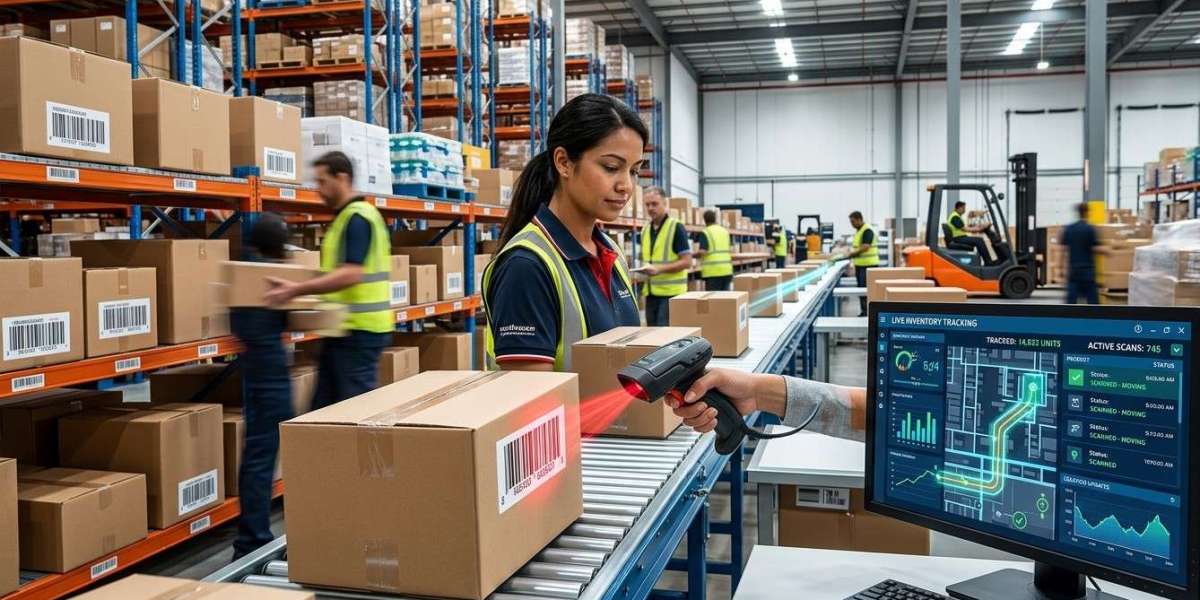
Inventory is constantly moving through modern businesses. Products arrive from suppliers, move into storage, transfer between warehouse locations, enter picking areas, and eventually leave the facility for customers or other business locations. Keeping track of every movement can become difficult when businesses depend on manual records and spreadsheets. Barcode technology provides a structured way to identify products and record inventory transactions as they happen.
By using barcode labels, scanners, mobile computers, printers, and inventory software, businesses can create a connected system for monitoring product movement. Each scan can capture information about an item and its current transaction, helping warehouse teams maintain more accurate and timely inventory records. Pointus Solutions can support businesses with barcode and Auto-ID technologies, while organizations can Shop Barcode equipment and select suitable Printing Products for their inventory tracking requirements.
What Is Real-Time Inventory Tracking?
Real-time inventory tracking means recording inventory transactions as they occur rather than waiting for employees to update records later.
For example, when a product arrives at a warehouse, its barcode can be scanned during receiving. When it is moved to a storage location, another scan can record the movement. Later, when the product is picked for an order, it can be scanned again.
A simplified workflow looks like this:
Receive → Store → Move → Pick → Pack → Ship
At each stage, barcode scanning can create a digital record of the inventory transaction.
The exact speed at which information appears in an inventory or ERP system depends on the software, network connection, and system configuration. However, barcode technology can significantly reduce the delay between a physical inventory movement and its digital recording.
Why Inventory Movement Visibility Matters
Knowing how inventory moves through a business is important for effective warehouse and supply chain management.
Without reliable movement records, businesses may struggle to determine:
- Where a product is currently located
- When it was received
- Whether it has been transferred
- Whether it has been picked
- Whether it has already been shipped
- Which warehouse currently holds the stock
- How much inventory is available at a particular location
Poor visibility can result in unnecessary searching, incorrect stock information, delayed fulfillment, and additional manual work.
Barcode technology helps create standardized identification points throughout the inventory lifecycle.
How Barcode Technology Tracks Inventory Movement
A barcode system assigns a machine-readable identifier to an inventory item, package, pallet, or location.
When an employee scans the barcode, the scanner captures the identifier and sends it to the connected software.
The system can then associate the scan with a transaction, such as:
- Receiving
- Put-away
- Location transfer
- Picking
- Packing
- Shipping
- Stock counting
- Returns
This allows businesses to create a history of inventory activity.
1. Faster Receiving and Inventory Entry
The first important movement occurs when products enter the warehouse.
Instead of manually typing product numbers into an inventory system, employees can scan incoming products or cartons.
The system can use the barcode to identify the item and retrieve its corresponding information.
During receiving, businesses may record:
- Product ID
- Quantity received
- Supplier
- Purchase order
- Batch number
- Serial number
- Receiving date
- Warehouse
This provides a digital starting point for tracking the product.
2. Accurate Put-Away Tracking
After receiving, products normally need to be moved to storage locations.
A warehouse can assign barcodes to aisles, racks, shelves, bins, and other storage areas.
Employees can scan the product barcode and then scan the destination location.
The inventory system can then associate the product with that location.
For example:
Product Barcode → Location Barcode → Inventory System
This simple process can help reduce the risk of products being placed in the wrong location or records showing an outdated location.
3. Visibility During Internal Stock Transfers
Inventory frequently moves between different areas of a warehouse.
For example, products may move from bulk storage to a picking area when order volume increases. Businesses may also transfer products between warehouses or branches.
Barcode scanning can record these movements.
An employee can scan the item and destination location during the transfer. The system can then update the inventory record according to the configured workflow.
This helps managers understand where inventory has moved without relying entirely on paperwork.
4. Improved Order Picking Visibility
Order picking is another important stage of inventory movement.
When an order is created, the warehouse system can provide the employee with the required product and location information.
The employee can scan the storage location and product barcode during picking.
This can help confirm:
- The correct location
- The correct product
- The correct order
- The selected quantity
Once the picking transaction is recorded, inventory availability can be updated according to the system's configuration.
This gives businesses better visibility into inventory that has moved from storage toward order fulfillment.
5. Better Packing and Shipping Tracking
After picking, products usually move to packing and shipping areas.
Barcode scanning can continue tracking the inventory at these stages.
At the packing station, employees can scan products to verify order contents. At shipping, they can scan cartons or shipment labels before dispatch.
This creates additional checkpoints between the warehouse and the customer.
Businesses can therefore maintain a more complete transaction history rather than relying on a single inventory update.
6. Real-Time Inventory Updates
One of the main advantages of barcode technology is faster data capture.
When a scan is connected to inventory software, the transaction can be recorded without requiring employees to manually enter the same information later.
Depending on the system configuration, inventory records can be updated immediately or shortly after the transaction.
This can help departments access more current information about inventory movement.
For example, sales teams may have better visibility into available stock, while warehouse managers can monitor inventory activity within their facilities.
7. Reduced Manual Data Entry
Manual data entry can introduce mistakes into inventory records.
Employees may type the wrong item number, select an incorrect product, or enter information into the wrong field.
Barcode scanning replaces much of this repetitive identification work with automated data capture.
Instead of typing:
Product Code: 7854639201
an employee can scan the corresponding barcode.
The software can retrieve the relevant product record and process the transaction according to the configured workflow.
This can improve consistency while reducing repetitive administrative work.
8. Better Multi-Warehouse Inventory Visibility
Businesses operating multiple warehouses often need to know not only how much stock they have but also where it is located.
Barcode systems can support standardized product and location identification across multiple facilities.
For example, a company may use:
- Product barcodes
- Warehouse codes
- Location barcodes
- Pallet labels
- Shipment labels
When integrated with centralized inventory or ERP software, these identifiers can help businesses track inventory movements between facilities.
This can provide a more organized view of stock across the wider operation.
9. Improved Returns Tracking
Inventory movement does not end when a product is shipped.
Customers may return products for various reasons, and returned goods need to be identified and processed correctly.
A barcode can help employees identify the returned product and retrieve its associated information.
The system can record whether the product should be:
- Returned to stock
- Sent for inspection
- Repaired
- Repacked
- Returned to a supplier
- Placed in a quarantine area
This creates greater visibility into the reverse movement of inventory.
10. Better Inventory Traceability
Barcode scanning can create a history of inventory transactions.
Depending on the software and barcode structure, businesses may be able to trace information such as:
- When an item was received
- Where it was stored
- When it was transferred
- When it was picked
- When it was shipped
- Which batch or serial number was involved
This can be particularly useful for businesses that need detailed inventory traceability.
The Importance of Barcode Labels
Reliable inventory tracking depends on readable barcode labels.
If labels are damaged, poorly printed, incorrectly sized, or unsuitable for the warehouse environment, scanning can become unreliable.
Businesses should consider label:
- Material
- Size
- Adhesive
- Print quality
- Durability
- Environmental resistance
For demanding warehouse applications, businesses may require durable synthetic labels or specialized materials.
The Role of Thermal Barcode Printing
Thermal printing technology is commonly used to produce barcode labels for inventory and warehouse applications.
Thermal printers can produce clear barcodes and are available in different configurations for desktop, industrial, and high-volume printing requirements.
Businesses should select printers based on:
- Expected printing volume
- Label dimensions
- Printing method
- Required resolution
- Connectivity
- Operating environment
Organizations can evaluate suitable Printing Products, including thermal barcode printers, ribbons, labels, and related accessories.
Choosing Barcode Scanning Equipment
Different inventory environments require different scanning devices.
Common options include:
Handheld Scanners
Useful for warehouse employees performing routine scanning tasks.
Wireless Scanners
Suitable when employees need to move freely around the warehouse.
Mobile Computers
Combine scanning capabilities with a display and computing functions, making them useful for receiving, picking, and inventory management.
Fixed Scanners
Useful at specific points such as packing stations, conveyors, or shipping areas.
When businesses Shop Barcode equipment, they should consider scanning range, barcode compatibility, connectivity, durability, and the specific workflow where the device will be used.
Integrating Barcode Technology with Inventory Software
Barcode technology delivers greater value when connected to inventory management software, ERP platforms, or warehouse management systems.
The scanner captures the barcode, while the software determines what the scan represents and what transaction should be recorded.
For example:
Scan Product → Identify Item → Select Transaction → Update Inventory → Record Movement
Integration can help reduce duplicate data entry and provide more consistent information across departments.
Best Practices for Real-Time Inventory Tracking
Businesses can improve their barcode implementation by following several best practices:
Use Standardized Barcodes
Create consistent barcode identification rules for products, cartons, pallets, and locations.
Barcode Warehouse Locations
Tracking where inventory is located is just as important as identifying the inventory itself.
Establish Scanning Checkpoints
Use scanning during receiving, put-away, transfers, picking, packing, and shipping.
Maintain Accurate Master Data
Make sure barcode numbers are correctly associated with product records.
Use Reliable Labels
Poor-quality labels can interrupt the scanning workflow.
Train Employees
Employees should understand the correct scanning sequence and procedures for handling exceptions.
Monitor Inventory Discrepancies
Regularly compare physical inventory with system records to identify problems and improve processes.
How Pointus Solutions Can Support Inventory Tracking
Building a barcode-based inventory tracking system requires the right combination of scanners, printers, labels, mobile devices, software, and business processes.
Pointus Solutions can support businesses looking for barcode and Auto-ID technologies for inventory, warehouse, retail, and supply chain operations.
Businesses can Shop Barcode scanners and related equipment according to their workflow requirements. They can also explore suitable Printing Products for producing product labels, location labels, pallet labels, and shipping labels.
A properly designed solution can connect physical inventory movements with digital records and help businesses establish a more organized approach to inventory management.
Conclusion
Tracking inventory movement is essential for businesses that want accurate stock information and efficient warehouse operations. Products can pass through many stages, from receiving and storage to internal transfers, picking, packing, shipping, and returns. Without reliable tracking, it can become difficult to understand where inventory is and how it has moved.
Barcode technology provides a practical method for recording these movements through consistent product and location identification. Scanners capture information quickly, while integrated inventory, ERP, or warehouse management software can process the resulting transactions.
With suitable barcode labels, reliable scanning equipment, thermal printing solutions, and standardized workflows, businesses can improve inventory visibility and reduce the amount of manual data entry required.
For businesses looking to strengthen inventory movement tracking, Pointus Solutions can provide barcode and Auto-ID solutions suited to different operational needs. Organizations can Shop Barcode equipment and select the right Printing Products to create a dependable inventory identification and tracking workflow.